Dynamic IVR

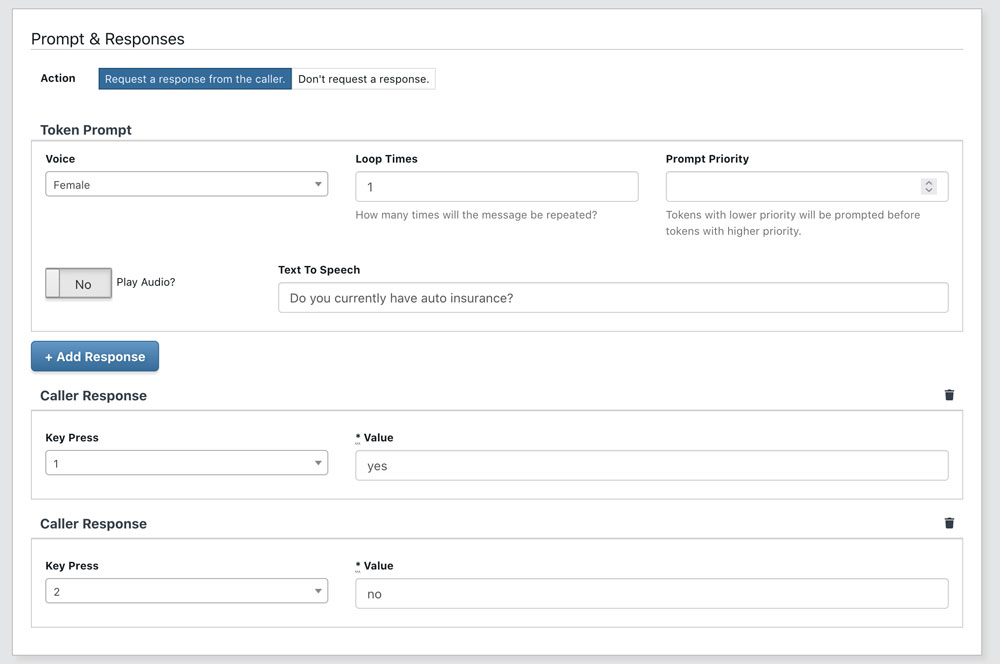
With TrackDrive, you can build complex Dynamic IVRs using call routers — nodes in a call flow graph that play messages, collect input, filter callers, and perform actions based on buyer filters and caller data.

Call Router Types

Each node in the IVR is a call router configured as one of three types:

  • Play A Greeting Message And Request A Keypress — standard IVR menu that plays a prompt and waits for DTMF input
  • Handle Call When No Keypress Is Requested — default handler that processes the call without requiring input
  • Ask A Question And Request An Answer — collect voice input from the caller

9 Call Router Actions

Each call router performs one of nine actions, giving you full control over the call flow:

Action What It Does
Forward To Buyers or Agents Route the call to matching buyers via the routing engine
Forward To Offer Transfer the call to a different offer's IVR flow
Request Key Press Play a message and wait for DTMF input from the caller
Add To Schedule Add the caller to an outbound schedule for follow-up
Place Caller In Hold Queue Put the caller in a hold queue with music until a buyer is available
Remove From Schedule Remove the caller from an existing schedule
Record Voicemail Record a voicemail message from the caller
Block Caller Block the caller from future calls
Hang Up End the call

Token-Based Caller Filtering

Each call router node can optionally filter callers using token-based matching. Filters use operators (==, !=, =~, >, <) to evaluate call attributes and only route matching callers through that node. This enables dynamic call flows that adapt based on caller data, geographic location, or any custom token value.

Webhook Integration Per Node

Call routers can fire custom webhooks before or after performing their action. This allows you to:

  • Notify external systems at each step of the IVR flow
  • Fetch data from external APIs to inform routing decisions
  • Set additional tokens on the call based on webhook responses
  • Play custom messages before executing the router's action (TTS or audio file)

Auto Try Next Buyer

When a buyer does not stay connected long enough, TrackDrive can automatically try the next available buyer without requiring the caller to re-enter the IVR. This ensures callers are connected to a live agent as quickly as possible.

Exception Handling

TrackDrive automatically creates exception handlers for common edge cases when an offer is set up. Each handler has a default action that can be customized:

Exception Default Action
No buyers are open Record Voicemail with TTS message that offices are closed
No buyers have matching filters Record Voicemail with TTS message that no agent is available
No buyers have open concurrency cap Place Caller In Hold Queue with TTS message that agents are busy
No buyers answer Record Voicemail with TTS message to leave a message

These exception handlers can be fully customized — replace the default action with any of the 9 available actions, add custom messages, or fire webhooks to notify your team when exceptions occur.

Questions?

We're here to help. Speak with a specialist.

Call (855) 387-8288

Request a Demo

See how TrackDrive can improve your results.

Request a Demo